
Scheduling is hard not because drawing a grid is complicated, but because that grid has to satisfy a pile of conditions pulling against each other: enough people at peak, cost under control, fairness for staff, and nobody scheduled into overtime. Drag one cell at a time in Excel and changing one person means rebuilding the whole sheet; poll availability over chat and you end up confusing yourself. This guide breaks restaurant scheduling into 7 steps you can follow, and finishes with the core logic of a reusable rota template.
Whether you're a single-store owner or run operations across ten branches, the skeleton of scheduling is the same. The only difference: with one store you can just about hold it in your head, but the moment you have several stores, you need a process and a tool that check the work for you.

The three marks of a good rota
A well-built rota does three things at once: it matches demand (staffed at peak, not carrying idle hands off-peak), it holds to the rules (no overtime, enough rest, qualified for the role), and it feels fair to staff (shifts spread evenly, time off granted). Miss any one of the three and the floor pushes back sooner or later. The 7 steps below exist to satisfy all three together.
01Map your team: who can work, and what they can do
The first step of scheduling isn't scheduling — it's seeing clearly who you have to work with. Lay out every employee's status (full-time / part-time / student), the slots they're available, the workstations they can run (till, kitchen, front of house, bar), and how many hours they want each week. Skip this step and the rota you produce is just "filling cells", not "assigning people".
The upside of recording skills in the system: when you need to schedule "this shift needs someone who can run the bar", the system tells you directly who qualifies, instead of relying on your memory. The more new hires, foreign workers and staff who cover multiple stores you have, the more this matters.
02Forecast covers: line the rota up with business
What your staffing has to line up with is the volume of business in each time slot. Pull last week's and last year's revenue and covers, and mark each day's peaks (lunch, dinner, weekend afternoon tea) and off-peak lulls. Promotions, events and long weekends push it up; bad weather and low season pull it down.
This step decides "how many people each slot needs". The finer you make it, the less you end up with the double failure of "slammed at peak, staff scrolling their phones off-peak". The value of AI scheduling is exactly that it drafts this most brain-intensive demand forecast for you first.
03Build the rota: how to frame a week
With a staff list and per-slot demand in hand, you can start dropping shifts in. In practice the smoothest approach is "copy last week, then adjust locally": restaurant shift patterns look similar week to week, so there's no need to start from zero every time — just change a few cells for this week's time off, events and new starters coming online.
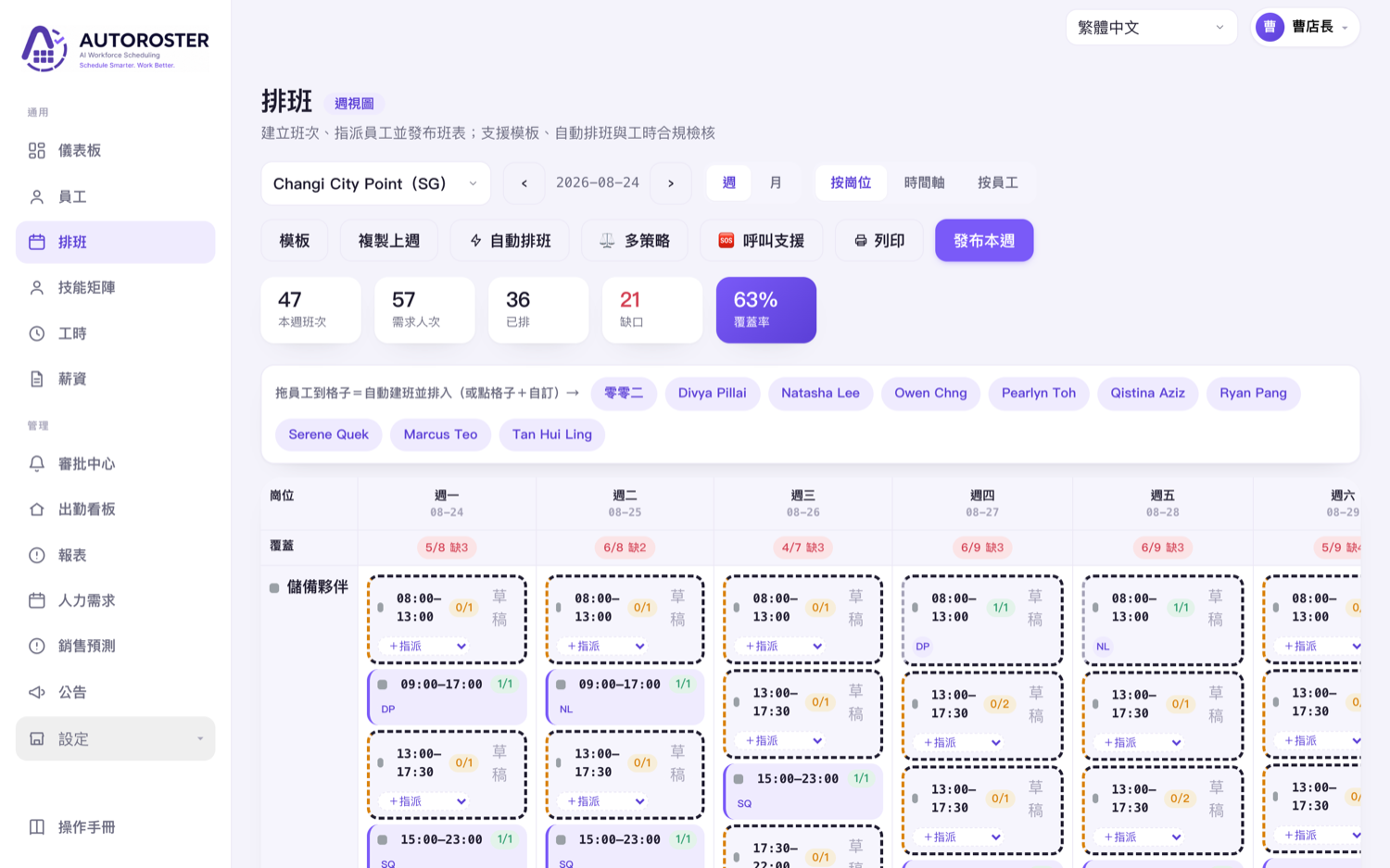
The key difference between drag-and-drop scheduling and Excel is that it calculates as you go: every shift you drop updates coverage, projected hours and labour cost immediately, so you don't have to finish and then go back to add it up. That turns "scheduling just right" into adjusting against the numbers, instead of going on gut feel.
04Apply the rules: block problems before you publish
A finished rota isn't a rota you can send. What goes wrong most often is accidentally scheduling someone into overtime, without enough rest, or on a day they'd booked off. Check that cell by cell by eye and, once you have several stores, you will miss something.
A scheduling system that checks the work compares against the rules the moment you assign — consecutive days, weekly hours, rest gaps between shifts, leave conflicts, missing qualifications — and flags any problem so you fix it before publishing, rather than having it blow up when you run payroll at month-end. The system automatically applies the rules for the jurisdiction each store sits in, so cross-border chains run on the same logic.
05Collect availability: put the group-chat chaos away
"Who can pick up two extra shifts this week?" dropped into a group chat gets a chorus of replies, silence from the people who didn't answer, and in the end you're chasing each of them yourself. Instead, let staff enter their available slots and preferences directly in the mobile app, and the system rolls it up into information you can see while you schedule.
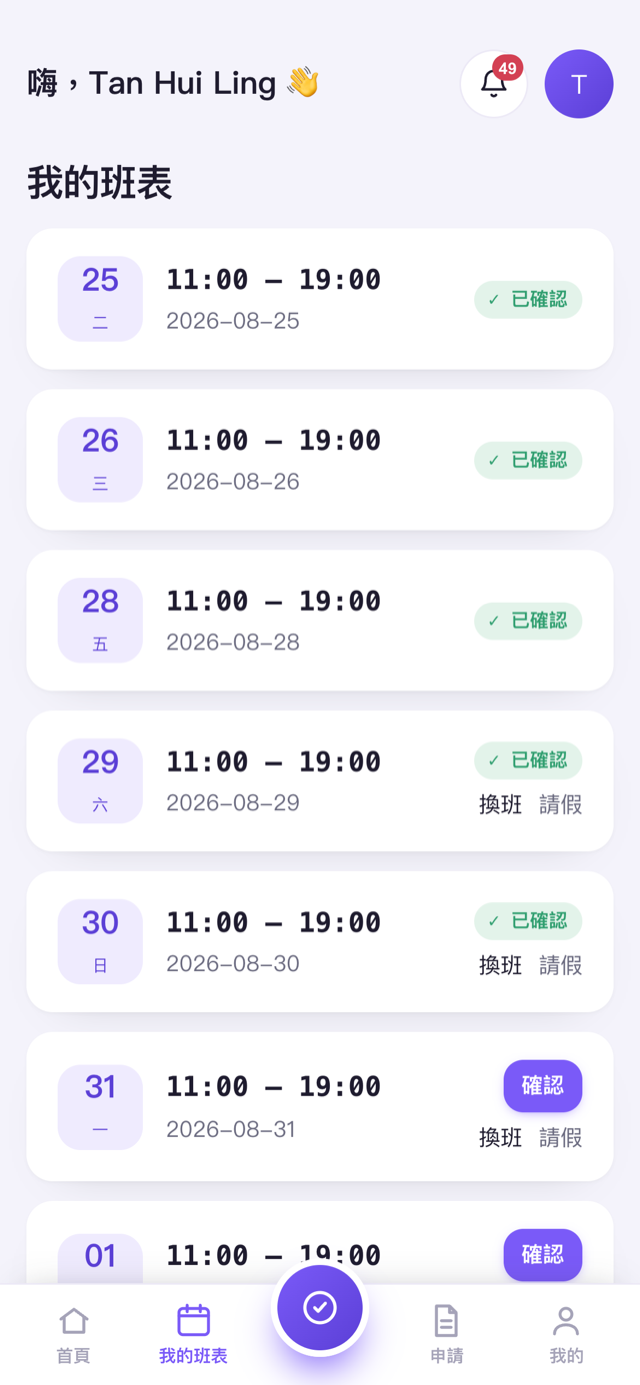
Employee side: your own rota, your own availability
In the app, staff can see their own schedule, enter their available slots, request a shift swap or pick up an open shift. Every change goes through the manager's approval and leaves a record, so there's no more "but I told you I couldn't work that day" with nothing to show for it.
06Publish and swap: keep the rota flexible but controlled
The rota isn't done the moment it's sent. A real store has variables every day: someone calls in sick, someone wants to swap, peak suddenly needs an extra hand. The point is to let the rota flex, while every change stays controlled and logged.
- Open-shift pickup — understaffed shifts are opened to qualified staff to claim, and slot back into the rota automatically once approved.
- Employee shift swaps — a two-person swap is initiated in the app, the manager approves in one tap, and the rota and hours update together.
- Notify on publish — the moment the rota is published or changed, it lands on staff phones immediately, no longer buried in a group broadcast.
07Review: use actual hours to improve the next round
Scheduling is a loop that gets more accurate the more you do it. At month-end, set "the shifts you scheduled" against "the hours actually clocked" and you'll see which slots are consistently over-staffed, which days are always short, and whose overtime keeps piling up. Those numbers are the basis for your next round of scheduling.
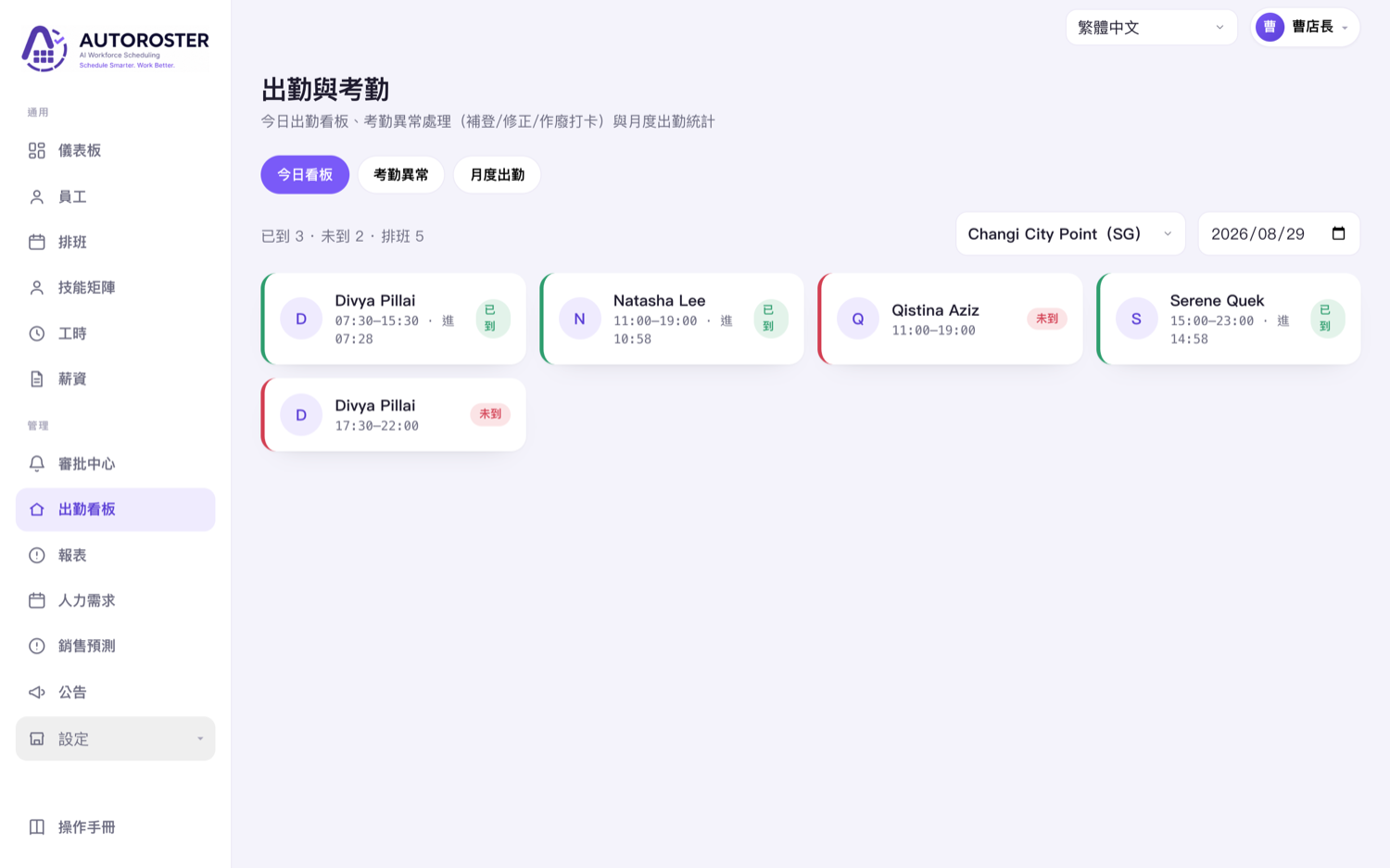
08The rota template: which columns should it have?
Plenty of people go looking for a ready-made "restaurant scheduling template". In truth the core logic of a template is just three dimensions — get them clear and you can apply it in any tool:
- Horizontal axis: dates — usually by the week, seven days in a row, so you can see the whole week's distribution.
- Vertical axis: employees or positions — one person (or one workstation) per row, making it easy to see who's on which shifts.
- Cells: shift content — the shift time (e.g. 11:00–15:00) and workstation, with a role or note where needed.
Add three more columns on top and the template is complete: each person's total hours for the week (to prevent overtime and gauge fairness), the staffing subtotal for each slot (to see if it's enough), and projected labour cost (to control budget). And this is exactly the limit of a fixed Excel template — those numbers have to be maintained by formulas of your own, and changing one cell can throw off the chain.
Scheduling was never just "drawing up a rota". It's a full flow from mapping your team, forecasting covers, scheduling, checking, collecting availability, publishing and swapping, through to review. Get that flow running smoothly and your rota gets faster and more accurate every round — covered at peak, cost under control, and staff who accept it as fair.