
"Punch me in, I'm still on the train." Nearly every restaurant manager has heard it. Buddy punching is hard to deal with not because any single instance is big, but because it's daily, small, and leaves no evidence — yet over a month it's real wages paid out, and it quietly erodes discipline across the whole store.
Traditional punch clocks, fingerprint scanners and paper sign-in sheets are either easy to bypass or bolted to one fixed machine that has to be re-wired if you move it. When you run multiple outlets, front and back of house, plus a rotating cast of part-timers and foreign workers, what you actually need is a way to clock in that binds person + time + location together — and that's exactly what phone-based location clock-in solves.
The cost of buddy punching hides in the details
Ten minutes late but an on-time punch; not there at all but a colleague clocked them in; forgot to clock out so the whole shift is a mess to reconcile. In a single store you might catch it by watching; across many outlets a manager can't stand next to every clock-in point. Location clock-in hands the "are they actually here?" question to the system.
01GPS geofencing: the most universal method
A geofence is intuitive: take the outlet's coordinates as the centre and draw a tolerance radius you set (say 120 metres). When staff clock in, the system checks whether their phone location falls inside that circle — inside is allowed, outside is blocked or flagged.
The key point: you set the clock-in point on a map in the back office — wherever the outlet is, that's where you put the circle. A high-street store, a night-market stall, a mall kiosk, even a temporary pop-up venue — you just tap the centre on the map and drag the radius. No hardware to install.
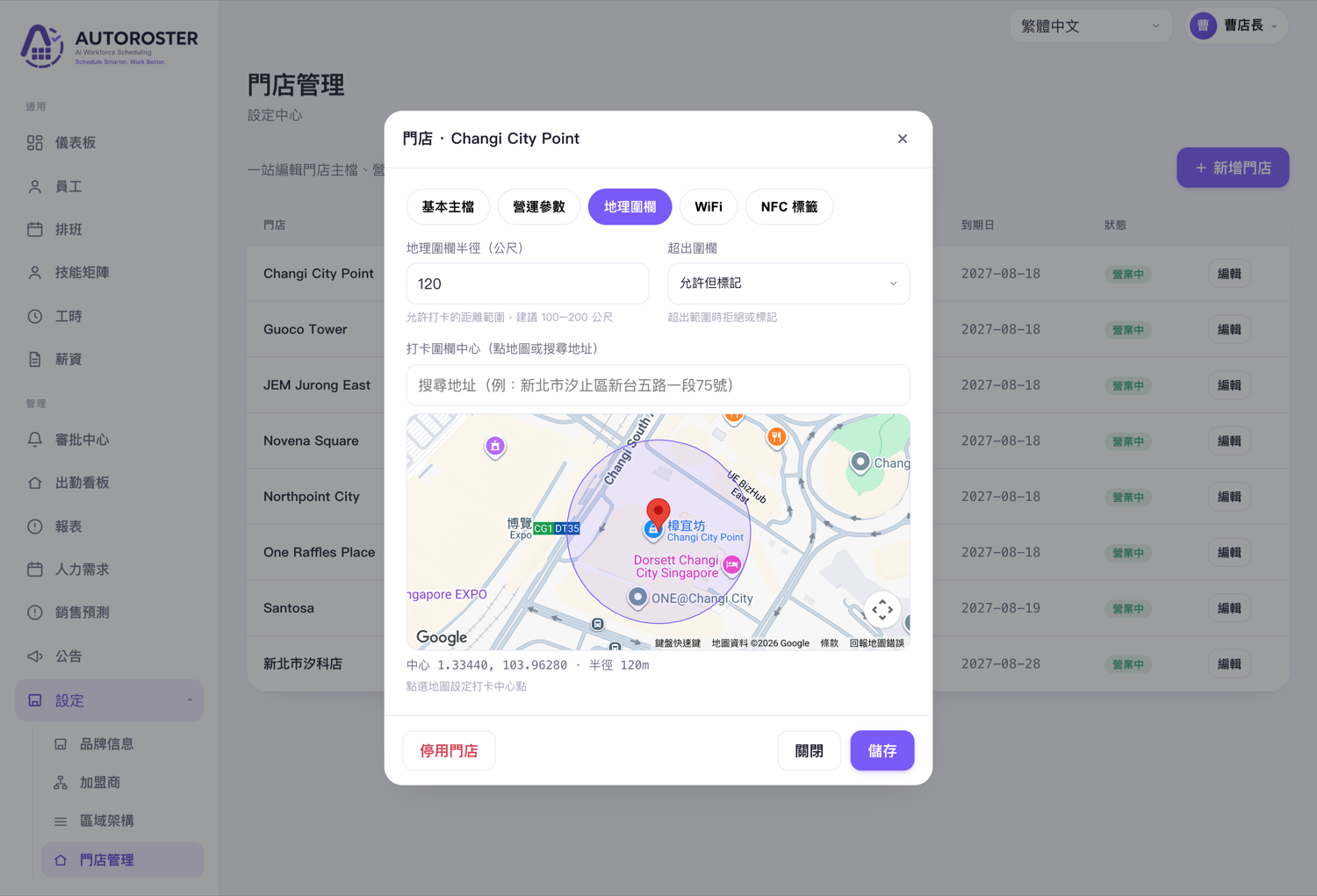
Three settings raise the anti-fraud strength of GPS clock-in another level:
- Tolerance radius — too small and location drift causes false blocks, too large and it's meaningless; 100–200 m is a good starting range, adjustable per site.
- Out-of-range handling — reject outright, or "allow but flag" for the manager to review later, balancing flexibility with discipline.
- Device binding & time correction — bind the account to a usual device and use server time, so changing the phone clock or using multiple devices doesn't create a loophole.
02WiFi & NFC: reinforcement for indoor and dense malls
GPS has one inherent weakness: indoors, underground or in dense high-rise areas, the signal drifts. In a basement food court or a shop-in-shop, GPS sometimes reads the wrong floor or the other side of the road. That's where WiFi and NFC come in closer to the ground.
WiFi clock-in
The system records the outlet's network identity; a staff phone connected to "this store's network" counts as on-site. Because WiFi range is the store interior, it actually fits the real outlet boundary better than GPS — ideal for indoor outlets.
NFC tag clock-in
Stick an NFC tag at the till or the staff entrance; staff tap it with their phone to clock in. The tag lives inside the store, so a person must be physically present to touch it — remote buddy punching becomes almost impossible. It's cheap, and very practical for dense malls and outlets with multiple entrances.
| Dimension | GPS geofence | WiFi clock-in | NFC tag |
|---|---|---|---|
| Best-fit outlet | Street-front, outdoor, pop-up | Indoor, mall shop-in-shop | Dense malls, many entrances |
| Hardware needed? | None | None | One NFC tag |
| Indoor/underground accuracy | May drift | High | Highest |
| Stops remote buddy punching | Strong | Strong | Strongest (must tap on site) |
| How to set up | Map: pick centre + radius | Bind store network | Stick tag, then bind |
03Working for foreign workers is the real restaurant need
Restaurant staffing is no longer "one kind of person". Front and back of house, full- and part-time, students, and increasingly foreign workers. However clever a clock-in system is, if staff can't read the interface or it's too fiddly, the floor simply won't use it.
AUTOROSTER's employee app starts from that reality: clocking in is one big button, the interface is multilingual (including English, Indonesian, Vietnamese and more), and no complex input is required. When covering multiple outlets, the app lists "the outlets you can clock in at right now" to switch between. Show up, open the app, tap Start — that's it.
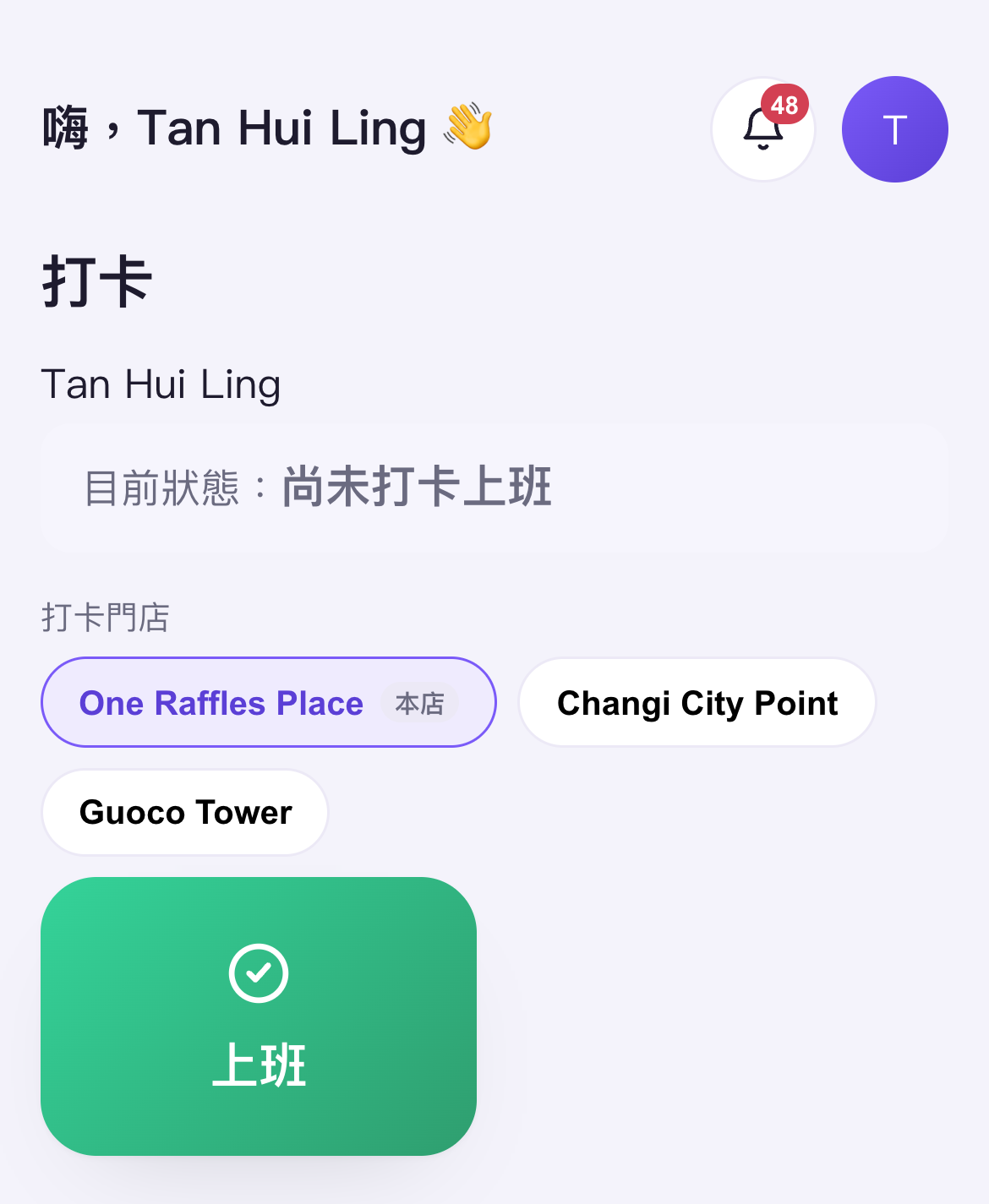
Employee side: one button to clock in
Current status up top, the outlets you can clock in at in the middle, and a big "Start" below. Staff covering multiple outlets switch straight to the one they're at — no matter which city that outlet is in. This is what "any location can be a clock-in point, any worker can use it" looks like.
04Preventing buddy punching is more than "location"
Location answers "are they on site?", but a serious clock-in system adds these lines of defence to truly close the gaps:
- Device binding — bind the account to a usual phone so one device can't clock in the whole store.
- Time correction — server time is authoritative; changing the phone clock does nothing.
- Duplicate-punch protection — one shift counts once; double taps and re-sends never double-count.
- Offline catch-up — no signal for a moment? Record locally and auto-sync on reconnect — no missed punches, no faked times.
- Out-of-range flags & photo verification — allow the odd exception but leave a record, so the manager sees exactly which entries need review.
Put together, clocking in is no longer "entering a time" — it's a record bound to person, time, location and device. When you calculate hours and pay at month-end, you get clean, traceable data instead of a pile of discrepancies to cross-check by hand.
From GPS geofencing and WiFi to NFC, plus device binding and offline catch-up — it was never about "which one is best", but whether you can pick the right combination for each outlet's environment and make it usable for every employee, foreign workers included. That's what buddy-punching prevention really means for a restaurant chain.